Add Tenant Level Preferences and Options for Profiles
The Guest tab allows users to add tenant level preferences and options for profiles. When a guest is ready to stay on the property, user can anticipate their profile preferences. For example, the property might offer several types of pillows specific to guest common preference i.e. down, foam, feather buckwheat etc. These preferences can be defined at both the tenant and property level.
Perform the following steps to add preferences and options:
Navigate to Settings ➜ All Settings ➜ Profile Preferences (under General).
Navigate to the Guest tab.
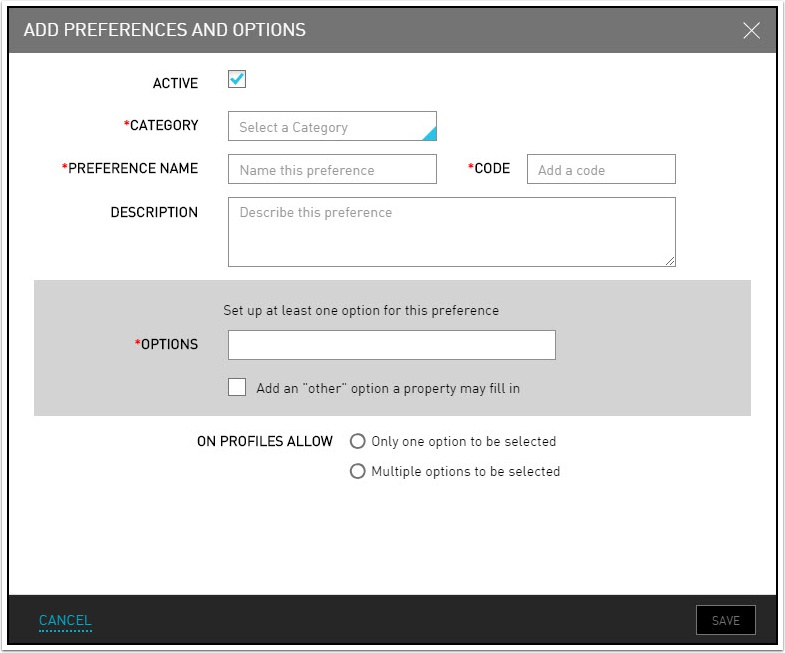
Click Edit For All Properties. The Add Preferences and Options dialog box appears.
If the user does not have the appropriate permissions to add preferences to the tenant, specific information is highlighted in gray and cannot be edited.
Refer to the following table and fill in the fields to add preferences and options:
|
Field |
Description |
|---|---|
|
Active |
Indicates that the preference is available for assignment. |
|
Category |
The appropriate category to account for choices. |
|
Preference Name |
The name of the preference. |
|
Code |
The code to identify the preference. |
|
Description |
The description about the preference. |
|
Options |
The option for the preference. The Add an option link appears once the user begins to type an option. |
Click Add an option to insert a new row for additional options for this preference.
Select the Add an "other" option a property may fill in checkbox to enable a guest room attendant to add additional options preferences.
Select a On Profiles Allow radio button to determine whether to show multiple options or just one option for this preference on the guest profile.
Click Save. The preferences and options are created.